Traffic cutover
Experimental feature
This is a new and experimental feature. Please make sure to test it before deploying to production and report any issues you find.
Traffic cutover involves moving application traffic (read and write queries) to the destination database. This happens when the source and destination databases are in sync: all source data is copied, and resharded with logical replication.
Performing the cutover
The cutover can be executed by running a command on the admin database:
Without a task_id, PgDog cuts over the first running replication task. To target a specific task, pass its id (as reported by SHOW TASKS):
Under typical conditions, the whole process takes less than a second, so applications shouldn't experience any errors or downtime.
Connecting through PgDog
In order for the cutover to work correctly and not lose any data, all applications must connect to the database through PgDog. Any applications that connect to the database directly, or through another proxy, will not receive the cutover signal and will continue to send writes to the source database, causing a split-brain situation.
CUTOVER is only needed when you run resharding manually (via COPY_DATA / REPLICATE). If you use the RESHARD command, the cutover step is executed automatically and you don't need to perform any additional steps.
CUTOVER only works on a migration that was started on this PgDog through the admin database (COPY_DATA, REPLICATE, or RESHARD). A migration started with the pgdog data-sync CLI runs in a separate process and cannot be cut over with CUTOVER command automatically.
In order to cut over a CLI migration by hand: once replication has caught up (check the log output of running the CLI), swap the source and destination in pgdog.toml and users.toml, run RELOAD on the serving instance, then stop the CLI. Pause writes (MAINTENANCE) while you do this to avoid losing in-flight transactions; there's no automatic rollback with this path. Then stop the CLI replication process and resume writes.
Step by step
PgDog performs the traffic cutover automatically, as the last step in the resharding process, with a sequence of steps:
| Step | Description |
|---|---|
| Pause queries | Stop the source cluster from serving traffic. |
| Synchronize databases | Allow the logical replication stream to drain into the destination database. |
| Swap the configuration | Swap the source and destination databases in pgdog.toml and users.toml. |
| Reverse replication | Set up a logical replication stream from destination database into source. |
| Resume queries | Resume traffic, with all queries going to the sharded cluster. |
Pause queries
In order for the traffic to be safely moved to the new, sharded database, it must contain the same data as the source. However, the source continues to serve write queries, so in order for the two to synchronize, PgDog needs to suspend traffic to the source database for a brief moment, allowing the replication stream to catch up.
To suspend traffic, PgDog turns on maintenance mode. This pauses all queries for all databases in the configuration until the maintenance mode is turned off. Clients will wait, with their queries buffered in their respective TCP connection streams. To the clients, it looks like the PgDog deployment is frozen and not responsive.
The replication lag threshold at which PgDog will pause traffic automatically is configurable in pgdog.toml:
By default, it's set to 1MB, which is low enough that when traffic is paused, the two databases will synchronize very quickly.
Synchronize databases
With the traffic paused, the logical replication stream will drain any remaining transactions into the destination database, bringing the replication lag down to zero. At this point in the cutover process, the two databases are byte-for-byte identical and traffic can be safely moved to the destination database.
Swap the configuration
If something goes wrong after the traffic is moved to the new (destination) database, PgDog has the ability to rollback the cutover step, redirecting the traffic back to the original (source) database.
For this to work, the original database must remain in the configuration files, so PgDog performs a swap: source becomes destination and destination becomes the source database. This is the equivalent of running sed s/source/destination/g (and vice versa) on both pgdog.toml and users.toml files, making sure the clients don't know the databases have been changed.
The configuration swap happens in memory, but PgDog has the ability to write the new configuration files to disk as well. This is disabled by default, but can be enabled with a setting:
When enabled, PgDog will backup both configuration files, pgdog.toml as pgdog.bak.toml and users.toml as users.bak.toml, and save its in-memory configuration to pgdog.toml and users.toml respectively, so the new cutover configuration persists in case of an error.
Multi-node deployments
If you're running more than one PgDog node, you should consider deploying our Enterprise Edition, which has support for saving the configuration files on multiple PgDog nodes at the same time.
Thresholds
Before swapping the configuration, PgDog waits for the two databases to be completely identical. These thresholds are configurable as follows:
Due to vacuum activity and transactions affecting other tables not in the publication, the replication lag between the two databases may never reach zero. For this reason, PgDog provides two triggers for the configuration swap:
- Replication lag, set to 0 bytes by default
- Time since last transaction executed on any table in the publication
The latter is computed from messages received via the replication stream and is a reliable metric of database activity for the tables in the publication.
Timeout
If these thresholds are not hit within a reasonable amount of time, PgDog will abort the cutover and resume traffic on the source database. This behavior is configurable:
If cutover_timeout_action is set to "cutover" instead, PgDog will flip the traffic to the destination database. This is an acceptable course of action in environments where data integrity is not paramount or the operator is absolutely certain that both databases are identical.
Reverse replication
To allow for rollbacks in case of any issues, prior to allowing queries on the new database, PgDog creates logical replication streams from the new database back to the original database. This replicates any writes made to the new database back to the source, keeping the two databases in-sync until the operator is satisfied that the new database is performing adequately.
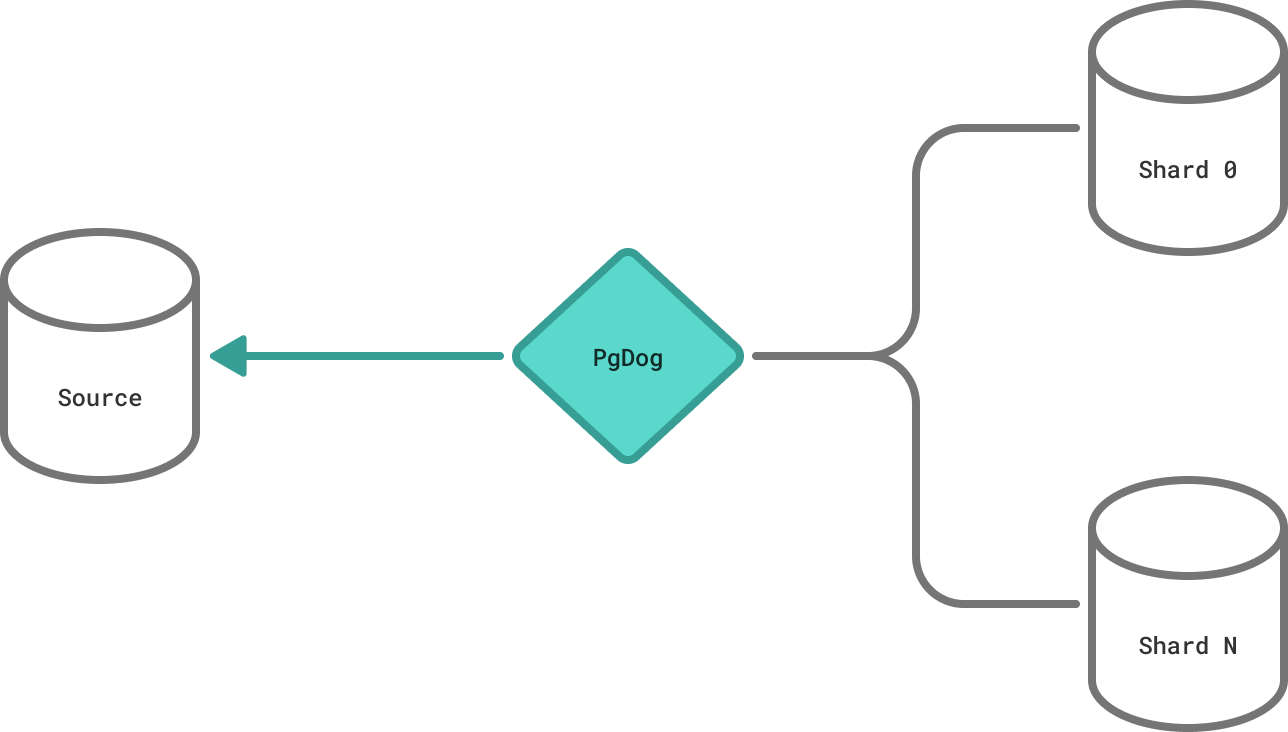
The reverse replication is created while the queries to both databases are paused, so it doesn't require any additional data copying or synchronization.
Resume queries
With the reverse replication set up, it is now safe to move traffic to the destination (now source) database. PgDog does this by turning off maintenance mode, and this step concludes the cutover. The entire process takes less than a second, typically, and allows PgDog to reshard Postgres databases without downtime.
After the cutover
Once the cutover completes, the reverse replication stream keeps the original cluster up to date with every write that now lands on the new cluster. It runs as a background task — find it in SHOW TASKS (its type is replication). While it is running, you can either roll back to the original cluster or, once you're satisfied, finalize the migration.
Rolling back
To restore traffic to the original cluster, run a CUTOVER against the reverse replication task, passing its id from SHOW TASKS:
This performs the same atomic swap in reverse: the source and destination are swapped back in pgdog.toml and users.toml, and traffic returns to the original cluster. Because the reverse stream kept the original cluster in sync, no data written to the new cluster is lost. The task's status in SHOW TASKS shows rolling back while this happens.
Restoring the configuration files
The rollback swaps the configuration back in memory (and on disk when cutover_save_config is enabled). If you enabled cutover_save_config, the configuration as it was before the original cutover is also preserved in the pgdog.bak.toml and users.bak.toml backups, so you can always restore the previous state by hand.
Finalizing the migration
When you're confident the new cluster is healthy and no longer need the ability to roll back, stop the reverse replication task:
This winds the reverse stream down gracefully and drops the replication slot it created, so Postgres can resume recycling WAL. After this point rollback is no longer possible — the migration is complete.
Don't leave reverse replication running indefinitely
Until the reverse replication task is stopped, its permanent replication slot prevents the new (now source) cluster from recycling WAL, which accumulates on disk. Issue STOP_TASK once you've decided not to roll back.